I recently wanted to integrate my VKS deployments into NSX Manager so that I could apply label-based Distributed Firewall rules. This is a high-level overview focused on integrating Kubernetes clusters with NSX. Additional posts will clarify the intermediate steps. However, here’s what worked for me in my VCF 9.0.1 environment!
Pre-req: Ensure the vSphere Supervisor is configured and functional
Install the NSX Management Proxy
When setting up the NSX Management Proxy, there is an option to apply a YAML service config. I’ve included an example which I used in my lab below. Notice the loadBalancerIP is blank — this is so the Supervisor can handle the IP allocation for you. I’m running a single NSX Manager instance in this setup, so the nsxManager value points directly to that specific address and not a VIP.
# proxy-config.yaml
loadBalancerIP: ""
namespace: svc-nsx-management-proxy-domain-c10
nsxManagers:
- "10.10.1.216"
Create a vSphere namespace where VKS will be deployed
This can be completed using a number of methodologies; I chose to create the namespace through vCenter and will publish a separate article on that process. For the purpose of this discussion, I created a vSphere namespace called wkld-03-proj-01.
Create a VCF Context
This context will allow you to apply the antreaConfig and then deploy the VKS cluster. The following will connect to the Supervisor endpoint which will then request the required information for context creation.
$ vcf context create --endpoint https://192.168.27.5 --insecure-skip-tls-verify --auth-type basic

? Provide a name for the context: admin
? Provide Username: jschulz@quadroolabs.com
Provide Password:
Use the context that was just created. The admin context includes the wkld-03-proj-01 namespace. Once the context is set, your kubectl commands will target the specific vSphere namespace.
$ vcf context use admin:wkld-03-proj-01Apply the antreaConfig yaml
In the vSphere namespace where VKS will be deployed (wkld-03-proj-01), apply the AntreaConfig manifest to enable integration with NSX Manager. NOTE: Each VKS deployment requires this step; there is currently no global enablement method.
# antreaConfig.yaml
apiVersion: cni.tanzu.vmware.com/v1alpha1
kind: AntreaConfig
metadata:
  name: vks-01-antrea-package
  namespace: wkld-03-proj-01
spec:
  antrea:
    config:
      featureGates:
  antreaNSX: true # Enabled for NSX integration
Deploy a VKS Cluster
Now that the antreaConfig has been applied, deploy the VKS cluster. I’ve chosen to apply a YAML manifest which defines the Kubernetes cluster. The cluster will be ready once the Available column becomes True.
$ kubectl apply -f vks-01-cluster.yaml

$ kubectl get cluster vks-01 -n wkld-03-proj-01 -w
NAME    CLUSTERCLASS            AVAILABLE   CP DESIRED   CP AVAILABLE   VERSION
vks-01  builtin-generic-v3.1.0  True        1            1              v1.32.3+vmware.1-fips
View integration in NSX Manager
Open the NSX Manager console and browse to System -> Fabric -> Nodes -> Container Clusters. The interface will show an entry for each integrated VKS cluster.

Deploy DFW Rules based on k8s labels
You can now begin applying DFW security rules based on Kubernetes labels. To view these, ensure vDefend licenses are applied and browse to Security -> Distributed Firewall.
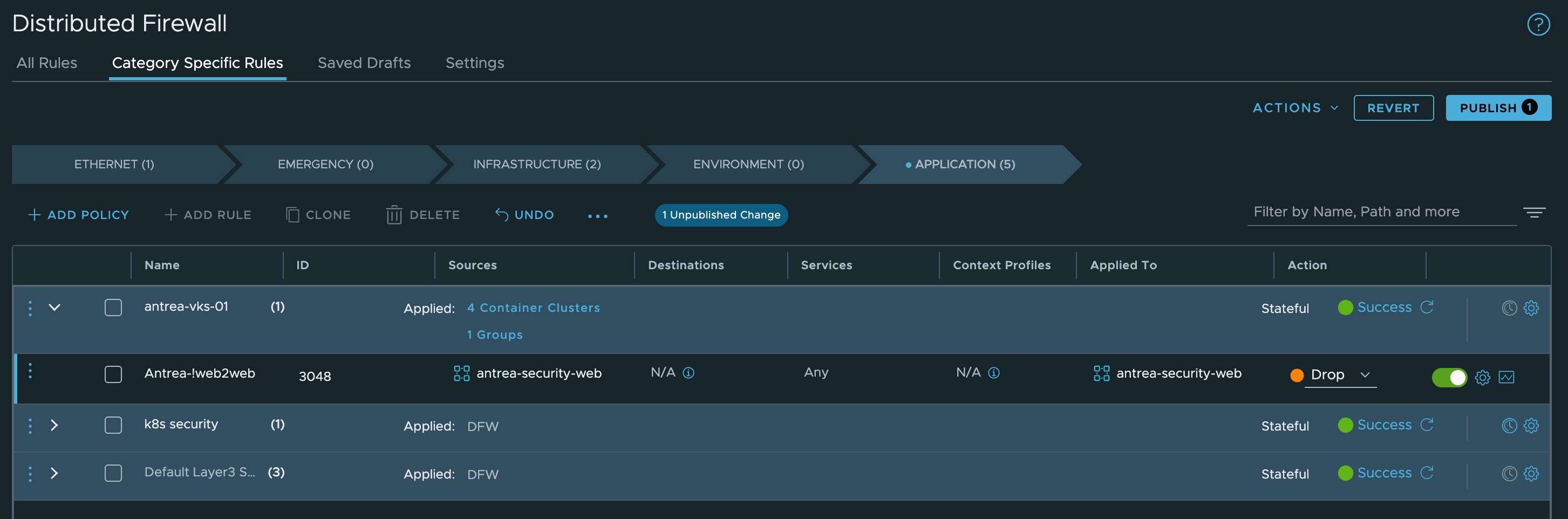
Well done!
Integrating VKS clusters with NSX Manager is a significant step toward achieving a zero-trust architecture within your vSphere environment. By successfully enabling the AntreaConfig integration, you’ve laid the groundwork for powerful, label-based security that moves with your applications. In future posts, we’ll dive deeper into specific Distributed Firewall (DFW) strategies and how to maximize your vDefend licensing to secure these workloads at scale.
 Cloud Management | Jon Schulz
Leave a comment